Streamer Guide
Starting a Pokémon TCG Live Stream: Equipment, Script, and Inventory Checklist
Pokémon card livestreaming has become a visible part of live commerce and hobby selling. Open a TikTok Live or Whatnot room during a Scarlet & Violet—Surging Sparks release week and you’ll see hundreds of viewe...
July 1, 2026 · 10 min read
Introduction
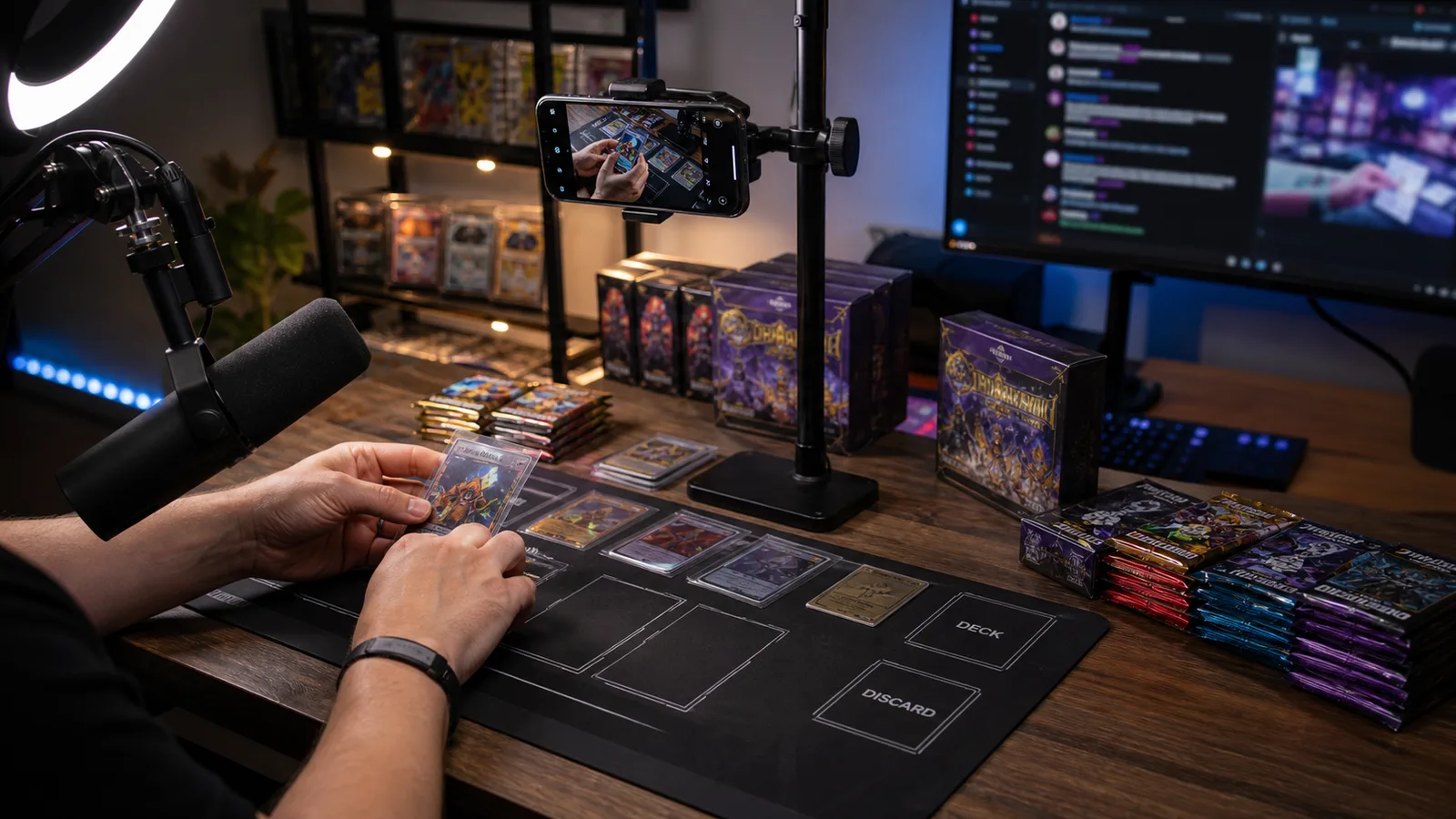
Pokémon card livestreaming has become a visible part of live commerce and hobby selling. Open a TikTok Live or Whatnot room during a Scarlet & Violet—Surging Sparks release week and you’ll see hundreds of viewers watching someone slice open booster packs in real time. The barrier to entry is lower than you think — but going in unprepared costs money and viewers. Bad lighting makes holofoils look flat. Awkward dead air drives people to the next stream. Running out of inventory mid-stream kills momentum you can’t recover. This guide gives new streamers a practical starting point before spending heavily on equipment or inventory.
Equipment Checklist: Three Budget Tiers
Don’t let equipment be the excuse that stops you from starting. Some of the most successful card breakers on TikTok began with nothing more than a smartphone and a $25 ring light. Pick your tier based on actual budget and upgrade as revenue justifies it.
Budget Setup ($200–400)
This is where most new streamers should start. The returns on premium gear don’t justify the spend until you have consistent viewership and revenue.
Key tip: Position your ring light at a 45-degree angle to the card surface, not directly overhead. Direct top-down lighting creates hot spots on holofoil textures that make pulls hard to appreciate on camera.
- Item
- Recommended Model
- Approx. Price
- Why It Matters
- Camera
- iPhone 12+ or Samsung Galaxy S21+
- $0 (owned) – $400
- Modern smartphone cameras handle 1080p streaming without issue
- Lighting
- 10” ring light with tripod mount
- $25 – $45
- Even lighting prevents glare on card surfaces
- Stand
- Desktop gooseneck phone holder
- $15 – $30
- Frees both hands for opening packs
- Microphone
- Rode Wireless GO II or JLab Talk GO
- $80 – $150
- Audio quality matters more than video quality for retention
- Extras
- Matte black playmat as backdrop
- $15 – $25
- Reduces visual clutter, makes cards pop
Mid-Range Setup ($500–1,000)
Upgrade here once you’re streaming consistently (2+ times per week) and averaging 50+ concurrent viewers.
- Dedicated webcam or mirrorless camera: The Logitech Brio 4K ($130–$170) is the standard upgrade. For overhead cinematic quality, a Sony ZV-E10 ($600–$700) with an Elgato Cam Link 4K ($120) delivers broadcast-level card close-ups.
- Two-point lighting: A Neewer 18” key light ($60–$80) plus a smaller fill panel ($30–$50) eliminates shadows when showing card textures at angle.
- USB condenser microphone: The Audio-Technica ATR2100x-USB ($80–$100) captures cleaner voice audio without the wireless dropouts that plague budget mics during 3-hour streams.
- Second monitor: Any 21–24” monitor ($80–$120 used) dedicated to reading chat. You cannot engage viewers while toggling chat windows on your main screen.
Professional Setup ($1,500+)
For established breakers doing 4+ streams weekly or building a branded channel.
Most beginners should not start here — but knowing the upgrade path helps you buy gear that fits a future multi-cam workflow.
- Component
- Setup
- Purpose
- Multi-camera
- Overhead (card cam) + face cam
- Switch between reactions and card detail
- Stream deck
- Elgato Stream Deck MK.2 ($150)
- One-touch scene switching, sound effects, chat commands
- Green screen
- Collapsible 5×7” green screen ($60–$90)
- Branded backgrounds, clean product focus
- Streaming PC
- Dedicated machine with RTX 3060+, 16GB RAM
- Eliminates frame drops during high-chat moments
- Capture hardware
- Dual capture cards for multi-cam
- Synced feeds without OBS freezing
Platform Selection and Account Setup
Where you stream determines your audience, your revenue model, and your operational complexity. Most serious breakers eventually maintain presence on at least two platforms.
- Platform
- Best For
- Revenue Model
- Fee Structure
- Setup Complexity
- TikTok Live
- Discovery, viral growth
- Gifts, shop integration
- ~50% of gift revenue
- Low — mobile-first
- YouTube Live
- Searchable VODs, long-term content
- AdSense, Super Chat, memberships
- 30% of Super Chat; AdSense varies
- Medium — OBS recommended
- Whatnot
- Dedicated card audience, auctions
- Auction fees, buyer premium
- 8% seller fee + 2.9% processing
- Medium — app-based seller approval
- Instagram Live
- Existing follower monetization
- Badges, direct sales
- Low badge cut; sales off-platform
- Low — requires established following
Platform Deep Dive
TikTok Live is where I’d point any brand-new streamer. The algorithm actively favors card-opening content — the anticipation-reveal cycle drives watch time. TikTok’s “shop now” integration lets viewers purchase without leaving the app. The downside: you need 1,000 followers to unlock livestreaming, and gift revenue splits are steep.
YouTube Live wins for long-term asset building. Every stream becomes a VOD that can rank in search for “Paldean Fates booster box opening” months later. Super Chat revenue is more predictable than gift-based platforms. The trade-off is slower audience growth.
Whatnot is purpose-built for card breaking. The auction tools let viewers bid on individual packs in real time. Whatnot handles payment collection, randomization, and shipping labels. The 8% seller fee is reasonable for the infrastructure provided. Seller application takes 3–5 business days.
Instagram Live works best if you already have a following. Badge revenue is modest, but the real play is directing viewers to DMs for direct sales, bypassing platform fees entirely.
Account Preparation Checklist
Before your first stream:
- Verify identity and payment method on chosen platform (3–7 day lead time)
- Set clear return/refund policies — state them verbally every stream
- Link PayPal Business for off-platform sales
- Prepare a simple title card with your stream name
- Test stream privately to verify audio and camera framing
Script and Flow Design
The best breakers follow a structured rhythm. Viewers leave when they sense confusion or dead air. These templates give you a repeatable framework that still feels natural.
Opening (First 2 Minutes)
Purpose: Set energy, welcome returning viewers, establish what’s being opened and why it’s exciting.
Template:
“What’s going on everyone — welcome back, welcome if you’re new! Tonight we’ve got six booster boxes of Scarlet & Violet—Prismatic Evolutions and three Paldean Fates ETBs I finally restocked. Last stream we pulled that gold Mew EX — tonight we’re hunting the Charizard ex special illustration rare. Want pack slots? Drop a ‘ME’ in chat. Deal of the day: first five purchases get a free mystery hit pack. Let’s rip some packs!”
Key elements to always include:; Greeting that acknowledges both new and returning viewers; Specific product names and quantities; A “chase card” or hunting target (creates narrative tension); The deal of the day (urgency driver); Clear call-to-action for participation
Main Loop (Repeated Per Pack or Box)
This is your bread-and-butter rhythm:
Timing target: Each pack should take 45–90 seconds. ETBs get 3–5 minutes. A full booster box should run 35–45 minutes including reactions.
- Open — Crack the pack, build anticipation with a brief pause
- React — Genuine response to the pull, even for bulk
- Show — Hold the card to camera, rotate to catch holofoil texture in light
- Price check — “That’s a $12 card right now on TCGPlayer, solid hit”
- Pack next — Transition immediately; dead air kills momentum
Chat Interaction Rhythm
Every 3–5 packs, dedicate 60–90 seconds to reading chat aloud and responding. This is what separates live streaming from watching a pre-recorded opening.
Chat interaction template:
“Let me catch up on chat — Mike says he’s still hunting that Iono full art. Sarah asks about mystery packs — yes, guaranteed one holo or better. PokémonTCG_Dad says his kid pulled a gold Miraidon from a single blister — insane luck! Alright, pack seven coming up…”
Name-drop chatters by username. Answer product questions. React to pull stories viewers share. This builds community faster than any giveaway.
Closing (Last 5 Minutes)
Template:
“Alright everyone, last pack for tonight. Recap: three illustration rares, that gold energy, and the Charizard ex going to buyer slot 4. Next stream is Wednesday 8 PM EST — I’ve got eight boxes of Surging Sparks landing Tuesday. Reserve a slot via DM or the link in bio. See you Wednesday!”
Closing checklist:; [ ] Recap major hits with specific card names; [ ] Announce next stream date and time; [ ] Tease upcoming inventory; [ ] Remind viewers how to purchase or reserve slots; [ ] End with energy — don’t trail off
Inventory and Supplier Setup
Your stream dies without product to open. Running out mid-stream is the cardinal sin of card breaking — it breaks momentum and sends viewers to competing streamers who still have packs to crack.
Starting Inventory Recommendation
For your first month of streaming (assuming 2–3 streams per week):
This mix gives you 8–12 streams worth of content. Variety keeps regular viewers engaged.
- Product Type
- Quantity
- Purpose
- Current expansion booster boxes
- 3–5 boxes
- Core content — what viewers tune in for
- Recent expansion booster boxes
- 2–3 boxes
- Budget-friendly slots for price-sensitive viewers
- Elite Trainer Boxes (ETBs)
- 2–3 units
- Visual variety, promotional content
- Collection/gift boxes
- 2–3 units
- Holiday tie-ins, themed streams
- Mystery hit packs (self-assembled)
- 10–20 units
- Giveaway tools, deal sweeteners, filler content
- Single blister packs
- 20–30 units
- Entry-level purchase for new viewers
Supplier Reliability Over Supplier Price
New streamers often obsess over saving $5 per box by sourcing from the cheapest supplier. What kills a streaming schedule is stock that doesn’t arrive when promised, product with dented corners, or orders cancelled because the supplier oversold.
What to prioritize in a supplier:; Confirmed allocation on upcoming sets (not “we’ll try to get it”); Pre-order windows that let you plan stream content 2–3 weeks ahead; Consistent restock schedule so you know when to reorder; Dent-free shipping — damaged boxes don’t look good on camera; Responsive communication for last-minute inventory needs
When choosing a supplier for stream inventory, prioritize confirmed allocation on upcoming sets, consistent restock schedules, and responsive communication. A supplier who can confirm what’s arriving and when lets you plan your content calendar with confidence. Price matters, but reliability matters more — running out of a hot set during release week costs more in lost viewership than you’ll save shopping around.
Simple Inventory Tracking
A simple Google Sheets spreadsheet handles this at the starter level:
Update this immediately after every stream. When “Qty Remaining” hits 2 boxes, place your restock order. Running out of a hot set during release week costs more in lost viewership than you’ll save shopping around for cheaper suppliers.
- SKU
- Product Name
- Qty Received
- Qty Streamed
- Qty Remaining
- Cost/Unit
- Example
- SV—Prismatic Evolutions BB
- 6
- 4
- 2
- $82.00
Top 5 Beginner Mistakes to Avoid
After watching hundreds of new streamers launch (and many flame out within a month), these are the patterns that predict failure:
1. Opening your entire inventory on camera with no reserve stock.
That first stream feels amazing — 30 people watching, great energy, you rip through six boxes in two hours. Then you have nothing to sell for two weeks while waiting for restock. Keep 30–40% of inventory unopened for direct sales and emergency content.
2. Not engaging chat enough.
A live stream with ignored chat is just a bad pre-recorded video. Talk to people, use their usernames, react to their comments. The personal connection is your moat against bigger streamers.
3. Inconsistent streaming schedule.
“I stream whenever I have time” is how you stay at 12 viewers forever. Pick specific days and times and stick to them for at least three months. Viewers build habits around your schedule. Miss your slot twice and they’ve already followed someone more reliable.
4. Underpricing packs to “buy viewers.”
Selling packs at a loss attracts price hunters who leave the moment someone else is cheaper. Price at sustainable margins from day one. Build viewership through personality and entertainment value, not by being the cheapest option.
5. Ignoring viewer feedback on product preferences.
When chat asks for Japanese sets, vintage openings, or specific new releases, they’re telling you what will grow your channel. If multiple streams have people asking for 151 or Journey Together product, that demand signal is worth more than your personal preference.
Getting Started: Your First-Stream Action Plan
Here’s the stripped-down checklist for going live this week:
Week 1: Order ring light + phone mount. Set up TikTok account and begin posting short pulls to hit 1,000 followers. Apply for Whatnot seller account. Source starter inventory.
Week 2: Do 3 private test streams to check audio/video. Prepare your opening script. Set up inventory spreadsheet. Announce your first stream 48 hours ahead.
Week 3: Go live — aim for 90 minutes, not 3 hours. Record what worked and what didn’t immediately after. Adjust for stream two.
If you are comparing Simplified Chinese Pokémon TCG products for live stream formats, you can contact Legendary TCG Vault with your target country, product type, and quantity range. We can help you compare suitable options.
Price Disclaimer
Prices and market demand can change quickly. Any examples in this article are for general comparison only and should be checked again before purchasing or listing products for resale.
Disclaimer
Legendary TCG Vault is an independent trading card wholesale supplier. We are not affiliated with Nintendo, Game Freak, Creatures, or The Pokémon Company.